Send SMS from your own code
A small, clean REST API. Send a message with one JSON request, and get delivery receipts and replies back through webhooks.
$ curl -X POST https://api.realay.io/send/sms \
    -H "Authorization: Bearer $REALAY_API_KEY" \
    -H "Content-Type: application/json" \
    -d '{"originator": "HarbourCafe",
         "recipient": "+61412345678",
         "text": "Your table is ready"}'
{
  "id": "550e8400-e29b-41d4-a716-446655440000",
  "recipient": "61412345678",
  "status": "QUEUED"
}
Your first message in three steps
Create an account
Sign up free, with no credit card. Top up your balance when you are ready to send real messages.
Make an API key
Create a key in the dashboard under Settings, API Keys. Keys last until you revoke them.
Send a request
POST a JSON body with the sender, the recipient and the text. The response gives you the message ID and status.
From one request to a delivered SMS
Send with a single API call, follow the message to the handset, and get replies back through webhooks. 30 seconds, no sound.
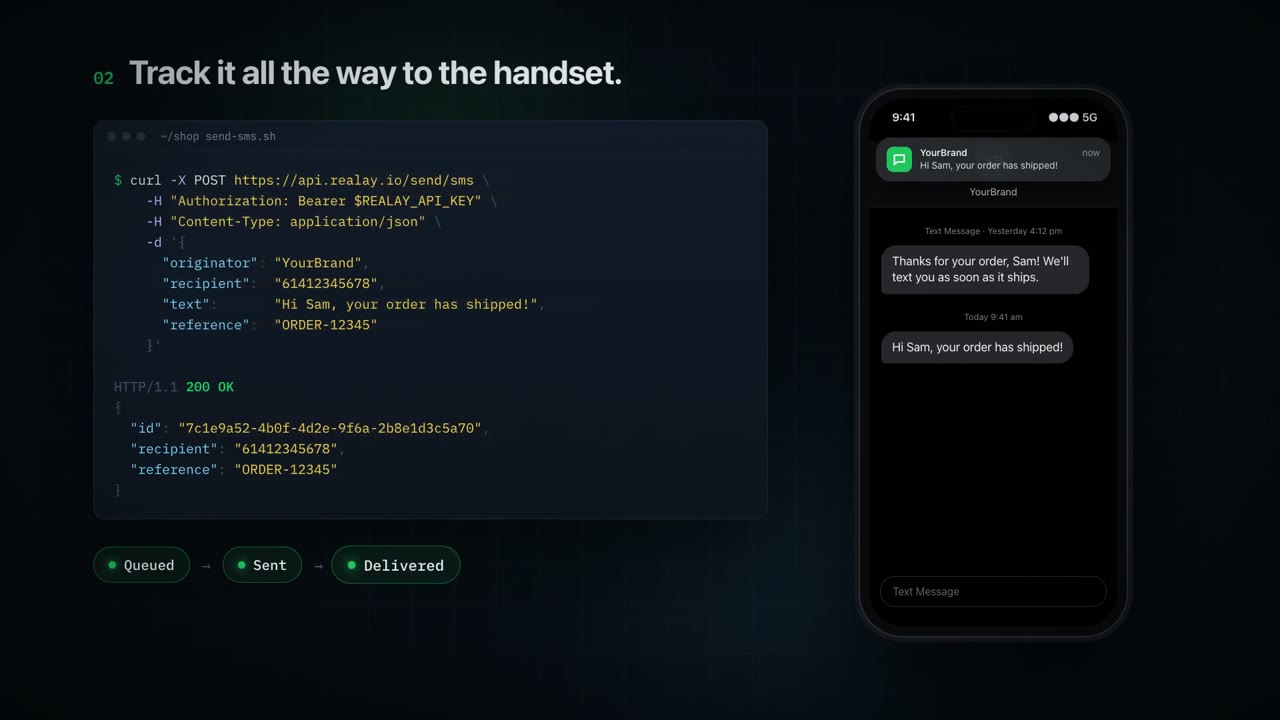
Send an SMS in your language
Every example sends the same message. Replace YOUR_API_KEY with a key from your dashboard.
curl -X POST https://api.realay.io/send/sms \
  -H "Authorization: Bearer YOUR_API_KEY" \
  -H "Content-Type: application/json" \
  -d '{
    "originator": "YourBrand",
    "recipient": "+61412345678",
    "text": "Hi Sarah, your order has shipped."
  }'
const response = await fetch('https://api.realay.io/send/sms', {
method: 'POST',
headers: {
'Authorization': `Bearer ${process.env.REALAY_API_KEY}`,
'Content-Type': 'application/json',
},
body: JSON.stringify({
originator: 'YourBrand',
recipient: '+61412345678',
text: 'Hi Sarah, your order has shipped.',
}),
});
console.log(await response.json());import os
import requests
response = requests.post(
"https://api.realay.io/send/sms",
headers={"Authorization": f"Bearer {os.environ['REALAY_API_KEY']}"},
json={
"originator": "YourBrand",
"recipient": "+61412345678",
"text": "Hi Sarah, your order has shipped.",
},
)
print(response.json())<?php
$ch = curl_init('https://api.realay.io/send/sms');
curl_setopt_array($ch, [
CURLOPT_POST => true,
CURLOPT_RETURNTRANSFER => true,
CURLOPT_HTTPHEADER => [
'Authorization: Bearer ' . getenv('REALAY_API_KEY'),
'Content-Type: application/json',
],
CURLOPT_POSTFIELDS => json_encode([
'originator' => 'YourBrand',
'recipient' => '+61412345678',
'text' => 'Hi Sarah, your order has shipped.',
]),
]);
echo curl_exec($ch);HttpClient client = HttpClient.newHttpClient();
String json = """
{"originator": "YourBrand",
"recipient": "+61412345678",
"text": "Hi Sarah, your order has shipped."}
""";
HttpRequest request = HttpRequest.newBuilder()
.uri(URI.create("https://api.realay.io/send/sms"))
.header("Authorization", "Bearer " + System.getenv("REALAY_API_KEY"))
.header("Content-Type", "application/json")
.POST(HttpRequest.BodyPublishers.ofString(json))
.build();
HttpResponse<String> response = client.send(request, HttpResponse.BodyHandlers.ofString());
System.out.println(response.body());Two endpoints cover most needs
The full request and response details are in the API reference.
POST/send/sms
Send one message
| originator | Sender ID or number the recipient sees |
| recipient | Mobile number in international format |
| text | The message |
| reference optional | Your own ID for the message |
| shortenUrl optional | Shorten links in the text |
| blockOptout optional | Set to true to skip numbers on your opt-out list |
POST/send/campaign
Send a campaign
| recipients | Contacts, contact groups or mobile numbers, in any mix |
| body | The message, with merge fields such as {firstName} |
| schedule optional | When to send, with scheduleTimezone |
| shortenUrls optional | Shorten links in the message |
| allowOptouts optional | Set to false to skip numbers on your opt-out list |
| optoutListId optional | Which opt-out list to check |
| allowDuplicates optional | Send to a number more than once |
Get updates pushed to you
Add your URLs in the dashboard and realay posts to them as things happen. A test button sends a sample so you can check your endpoint.
- Delivery receipts when a message is delivered or fails
- Incoming messages when someone replies
- Link clicks when someone opens a short link
API keys you control
Send your key in the header on every request:
Authorization: Bearer YOUR_API_KEY
Create as many keys as you need, and revoke any of them from the dashboard. Keep keys on your server, never in a web page or app.
Get your API key
Sign up free and create a key in minutes. No credit card and no contract.